
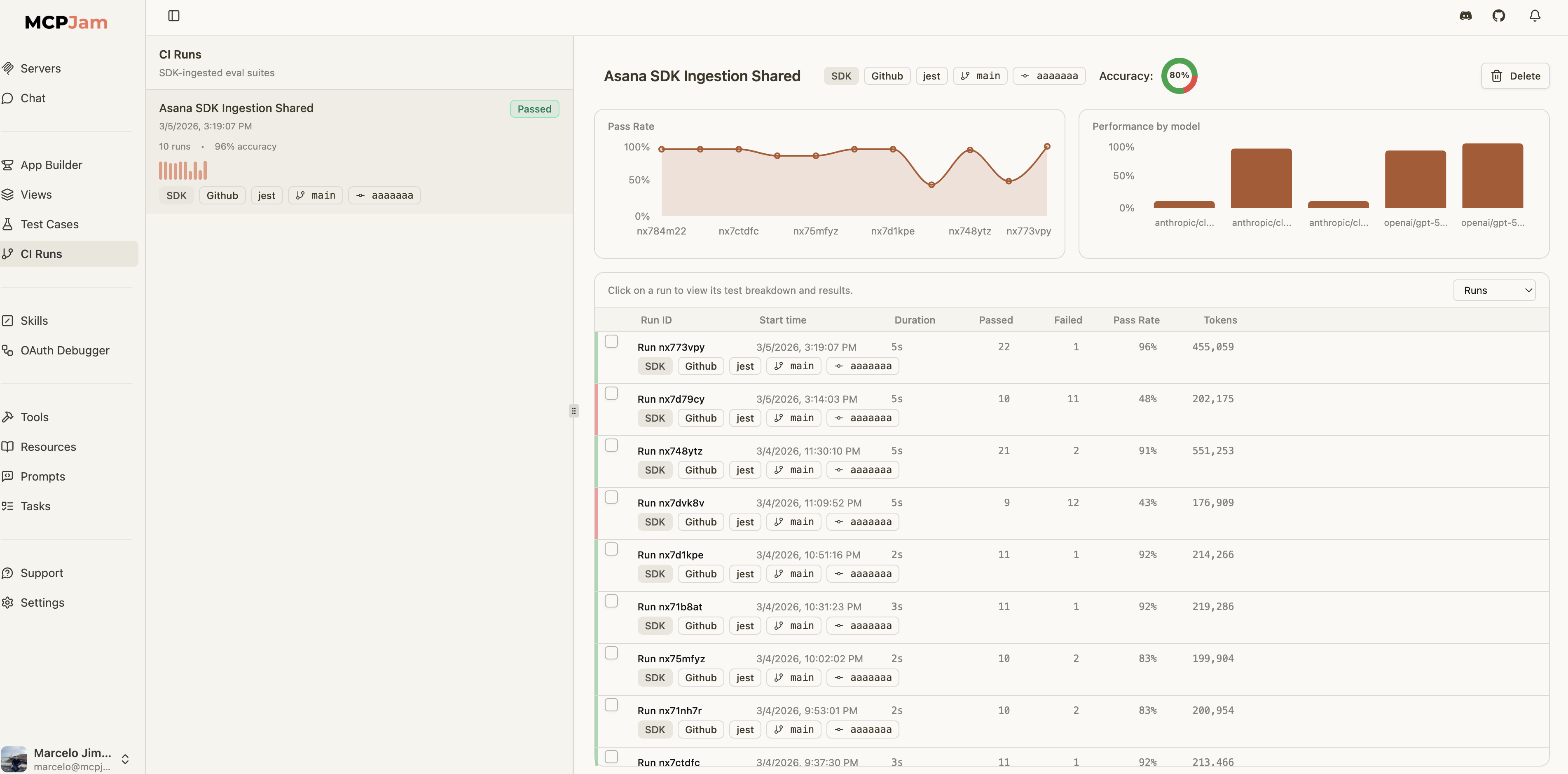
After running evals, you can save results to MCPJam to track accuracy over time, compare across branches, and get visibility in the CI Evals dashboard.
CI Runs overview

Setup

Set your MCPJam API key as an environment variable:
export MCPJAM_API_KEY=mcpjam_...
That’s it — both EvalTest and EvalSuite will auto-save results when this key is available. MCPJAM_API_KEY enables result uploads. Attach the connected MCPClientManager to TestAgent (or pass agent / mcpClientManager to manual reporting APIs) when you need either of the following:
  1. MCP App / widget replay in Evals traces — After each MCP App tool call, the agent uses the manager’s readResource to fetch HTML from the tool’s ui.resourceUri and fills widgetSnapshots on PromptResult. Without the manager, traces still upload (messages + spans) but widgets will not replay in the dashboard. The tool’s JSON result alone is not enough for offline iframe replay.
  2. Replay credentials (authenticated HTTP MCP) — The SDK can persist server connection details for debugging and reruns. You do not need to build a second secret object yourself; replay config is derived automatically when the agent or manager is attached.

Auto-Save from EvalTest

When MCPJAM_API_KEY is set, EvalTest.run() automatically saves results:
await test.run(agent, {
  iterations: 30,
  mcpjam: {
    suiteName: "Addition Eval",
    passCriteria: { minimumPassRate: 90 },
  },
});
Tool execution: Auto-saved payloads use the same pass/fail rules as the eval reporting reference: failed tool calls default to passed: false unless you set failOnToolError: false on the mcpjam object. For authenticated HTTP servers:
import { MCPClientManager, TestAgent } from "@mcpjam/sdk";

const manager = new MCPClientManager({
  asana: {
    url: process.env.MCP_SERVER_URL!,
    refreshToken: process.env.MCP_REFRESH_TOKEN!,
    clientId: process.env.MCP_CLIENT_ID!,
    clientSecret: process.env.MCP_CLIENT_SECRET,
  },
});

await manager.connectToServer("asana");

const agent = new TestAgent({
  tools: await manager.getTools(),
  model: "openai/gpt-4o-mini",
  apiKey: process.env.OPENAI_API_KEY!,
  mcpClientManager: manager,
});

await test.run(agent, {
  iterations: 30,
  mcpjam: { suiteName: "Asana Eval" },
});
To disable auto-save for a specific run:
await test.run(agent, {
  iterations: 30,
  mcpjam: { enabled: false },
});

Auto-Save from EvalSuite

Suites can be configured at construction or run time:
const suite = new EvalSuite({
  name: "Math Operations",
  mcpjam: {
    suiteName: "Math Eval",
    ci: {
      branch: process.env.GITHUB_REF_NAME,
      commitSha: process.env.GITHUB_SHA,
      runUrl: `${process.env.GITHUB_SERVER_URL}/${process.env.GITHUB_REPOSITORY}/actions/runs/${process.env.GITHUB_RUN_ID}`,
    },
  },
});
When a suite runs, individual EvalTest auto-saves are suppressed to avoid duplicate uploads. The suite consolidates all test results into a single run.

Manual Save APIs

For more control — custom test runners, CI post-steps, or framework-agnostic flows — the SDK provides dedicated APIs:
import {
  reportEvalResults,
  reportEvalResultsSafely,
  createEvalRunReporter,
  uploadEvalArtifact,
} from "@mcpjam/sdk";

// 1) One-shot save (strict — throws on failure)
await reportEvalResults({
  suiteName: "Nightly",
  mcpClientManager: manager,
  results: [{ caseTitle: "healthcheck", passed: true }],
});

// 2) One-shot save (safe — returns null on failure)
const result = await reportEvalResultsSafely({
  suiteName: "Nightly",
  results: [{ caseTitle: "healthcheck", passed: true }],
});

// 3) Incremental reporter (long-running processes)
// Assumes `agent` was created with `mcpClientManager: manager`
const reporter = createEvalRunReporter({
  suiteName: "Incremental",
  agent,
});
await reporter.record({ caseTitle: "step-1", passed: true });
await reporter.record({ caseTitle: "step-2", passed: false, error: "timeout" });
const output = await reporter.finalize();

// 4) Artifact upload (JUnit XML, Jest JSON, Vitest JSON)
await uploadEvalArtifact({
  suiteName: "JUnit import",
  format: "junit-xml",
  artifact: junitXmlString,
});
reportEvalResults() and createEvalRunReporter() resolve replay credentials in this order:
  1. serverReplayConfigs if you pass it explicitly
  2. agent.getServerReplayConfigs()
  3. mcpClientManager.getServerReplayConfigs()
Most users should pass agent or mcpClientManager and let the SDK derive replay credentials automatically. Use serverReplayConfigs only as an advanced override. When replay configs are inferred from agent or mcpClientManager, the SDK limits them to the serverNames you attach to the run when serverNames is provided. Manual reporters (Vitest/Jest hooks): Pass agent or mcpClientManager into createEvalRunReporter — not only on TestAgent — and call await reporter.finalize() before await manager.disconnectAllServers() so replay config is still available at upload time. See Replay metadata for the MCPJam UI.

CI Metadata

Attach CI/CD context to your eval runs for traceability in the dashboard:
await reportEvalResults({
  suiteName: "Nightly",
  results: [...],
  ci: {
    provider: "github",
    branch: process.env.GITHUB_REF_NAME,
    commitSha: process.env.GITHUB_SHA,
    runUrl: `${process.env.GITHUB_SERVER_URL}/${process.env.GITHUB_REPOSITORY}/actions/runs/${process.env.GITHUB_RUN_ID}`,
    pipelineId: process.env.GITHUB_WORKFLOW,
    jobId: process.env.GITHUB_JOB,
  },
});
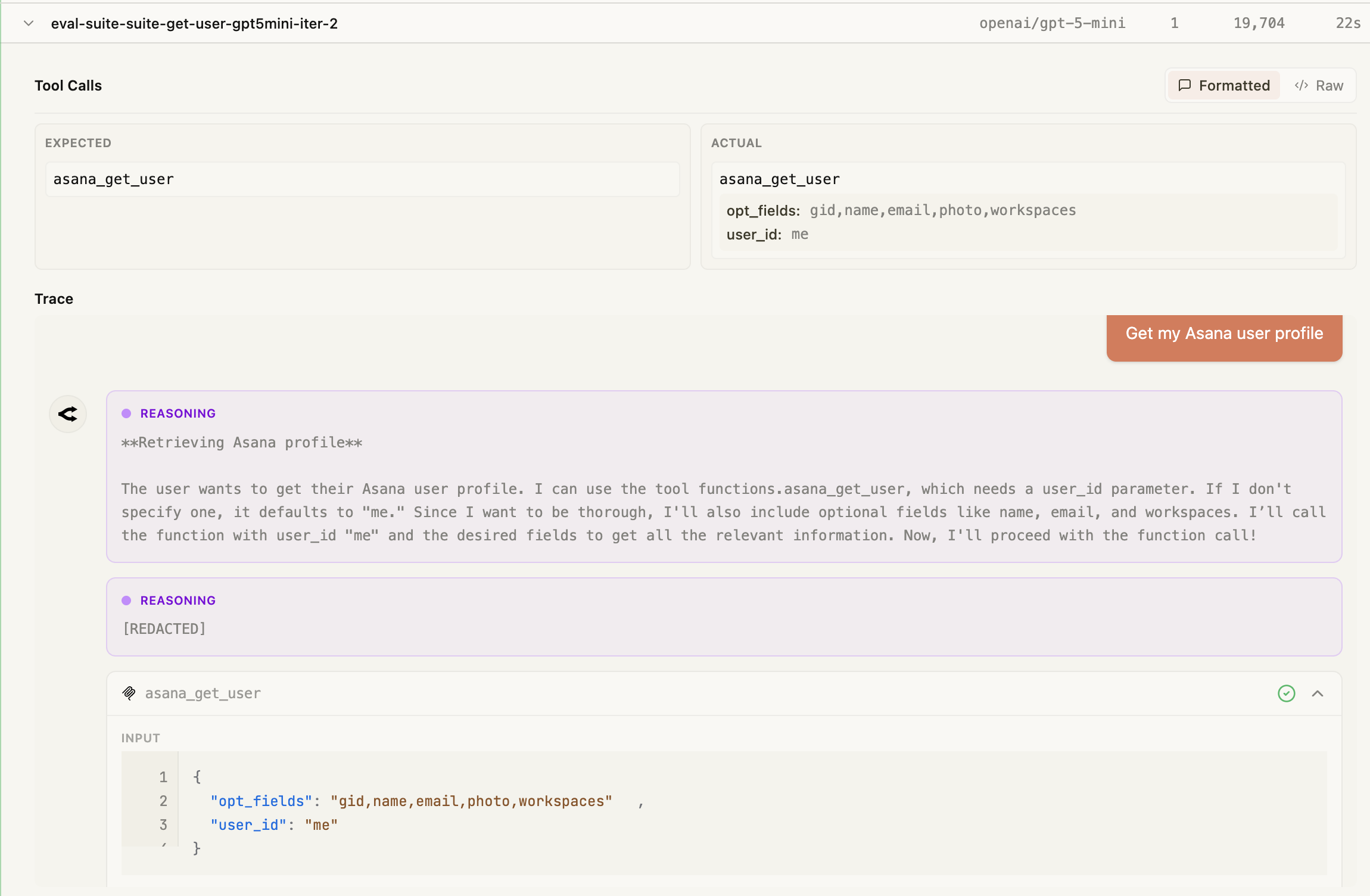
Each iteration records the expected and actual tool calls side by side, along with the model’s reasoning trace, so you can pinpoint exactly why a test passed or failed:
Test case detail view

Next Steps

Running Evals

Learn about EvalTest, EvalSuite, and iteration strategies

Saving Results Reference

Full API reference for all saving and reporting methods